See what your
network is actually
talking to.
Nyxtrace is Network Detection & Response for homelabs and small networks that want to be secure. It watches your traffic, keeps an inventory of every device and explains incidents in plain language — on your own appliance, with no cloud required.
- SourcesZeek · NetFlow · Suricata · DNS
- Runs onYour own appliance
- CoreOpen source
- StatusEarly access
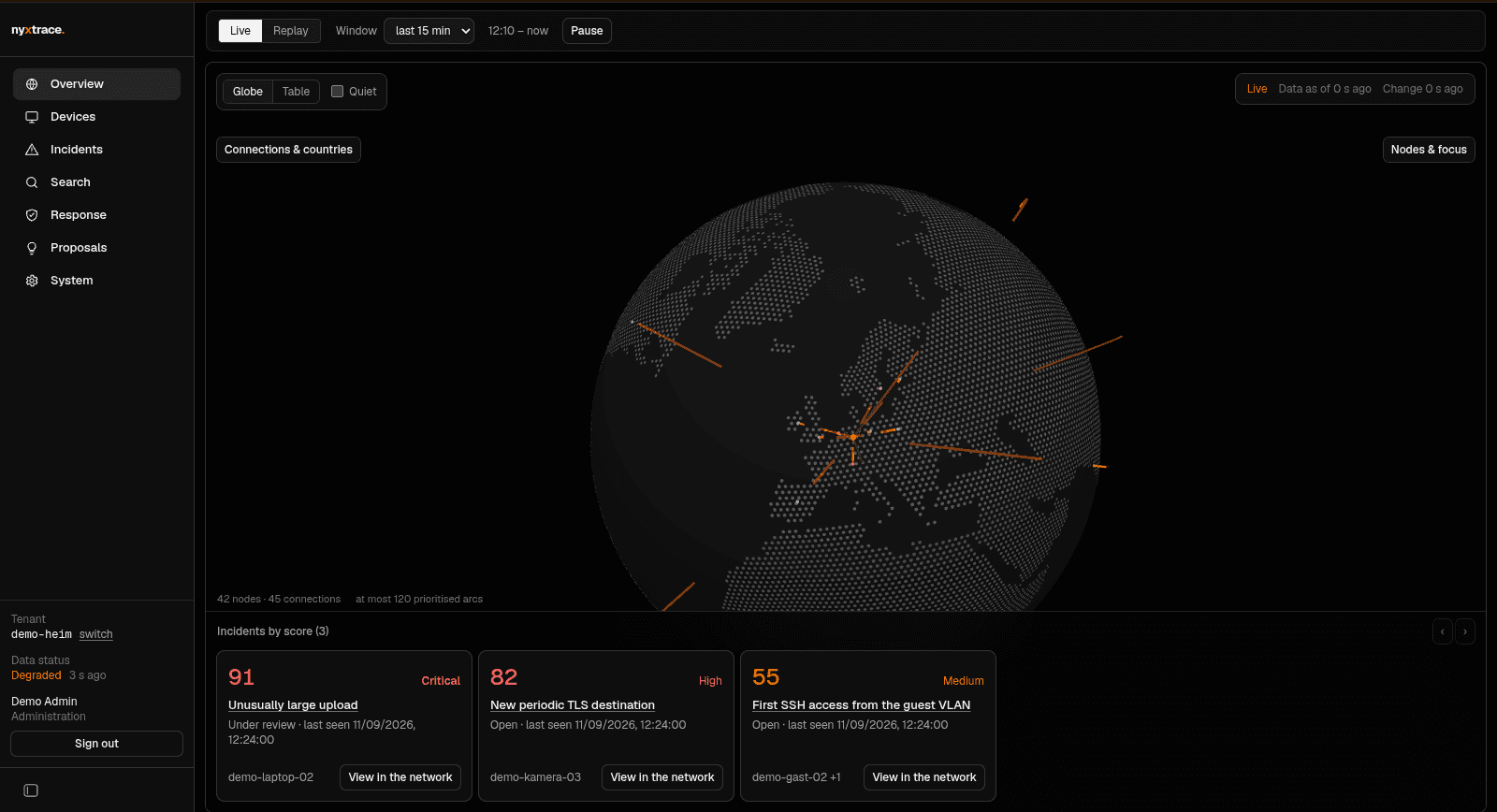
Illustration of the Threat Visualizer: one home network, external destinations. Sample topology, not measured traffic.
Modules
Four modules, one product
Nyxtrace ships as one appliance with one data model. Time ranges, filters, device identities and evidence are shared across modules — the navigation only shows what you actually have data for.
Threat Visualizer
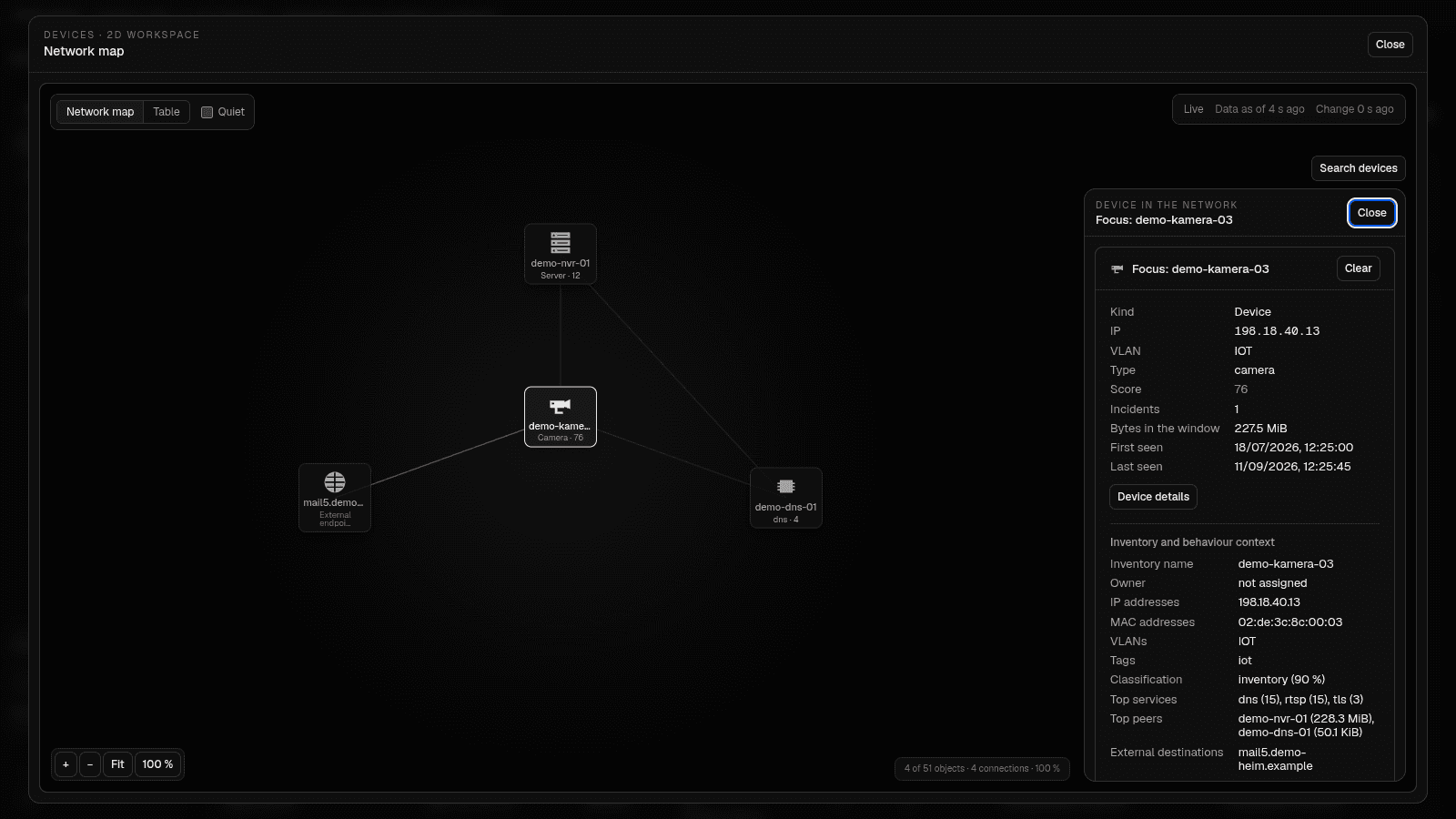
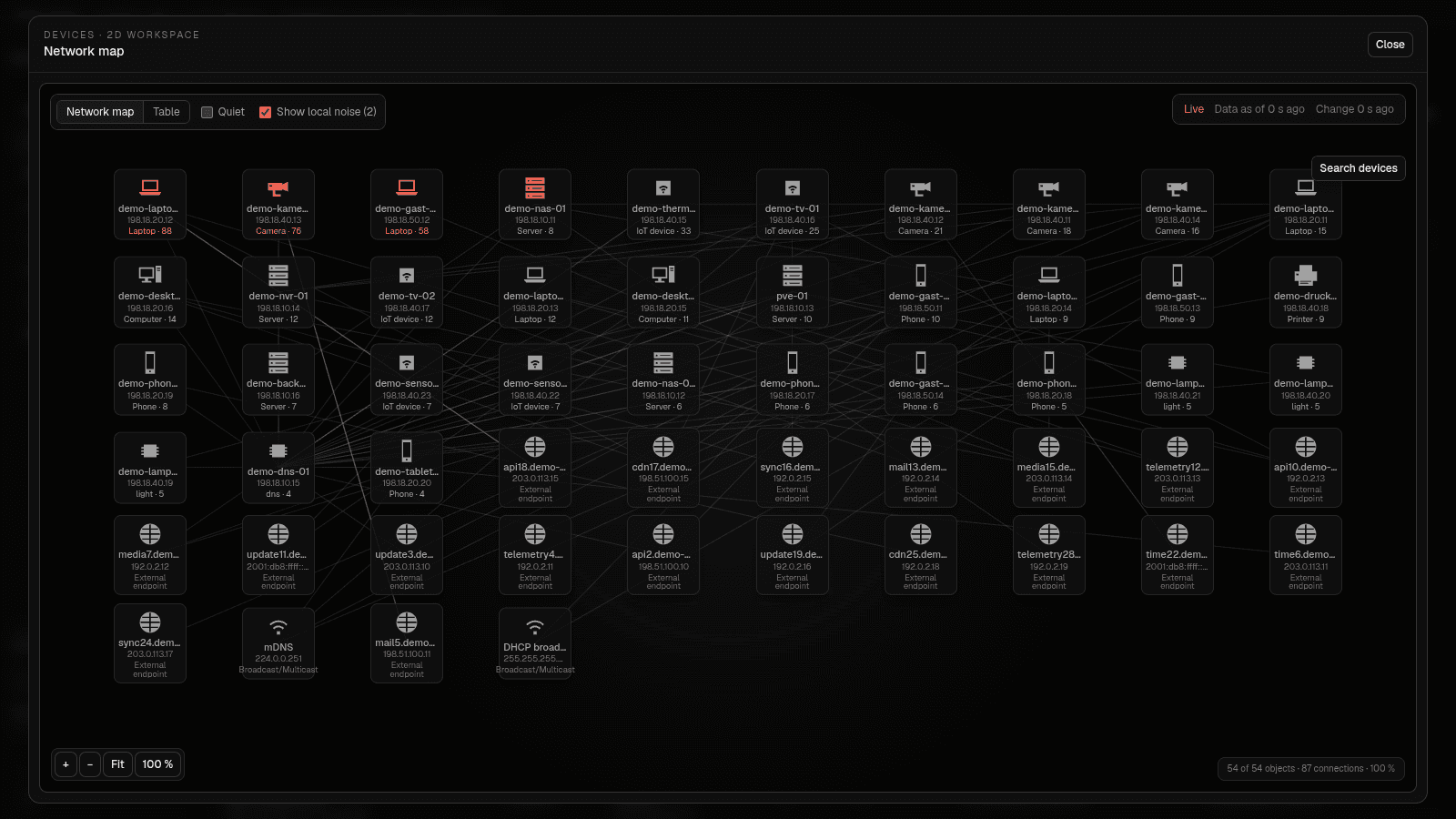
A live picture of your network: a 3D globe of external connections, a 2D map of internal relationships, and replay of any time window.
- 3D globe with live connection arcs
- 2D network map of device relationships
- Replay a time range, not just "now"
- Every relationship keeps its source record
Cyber AI Analyst
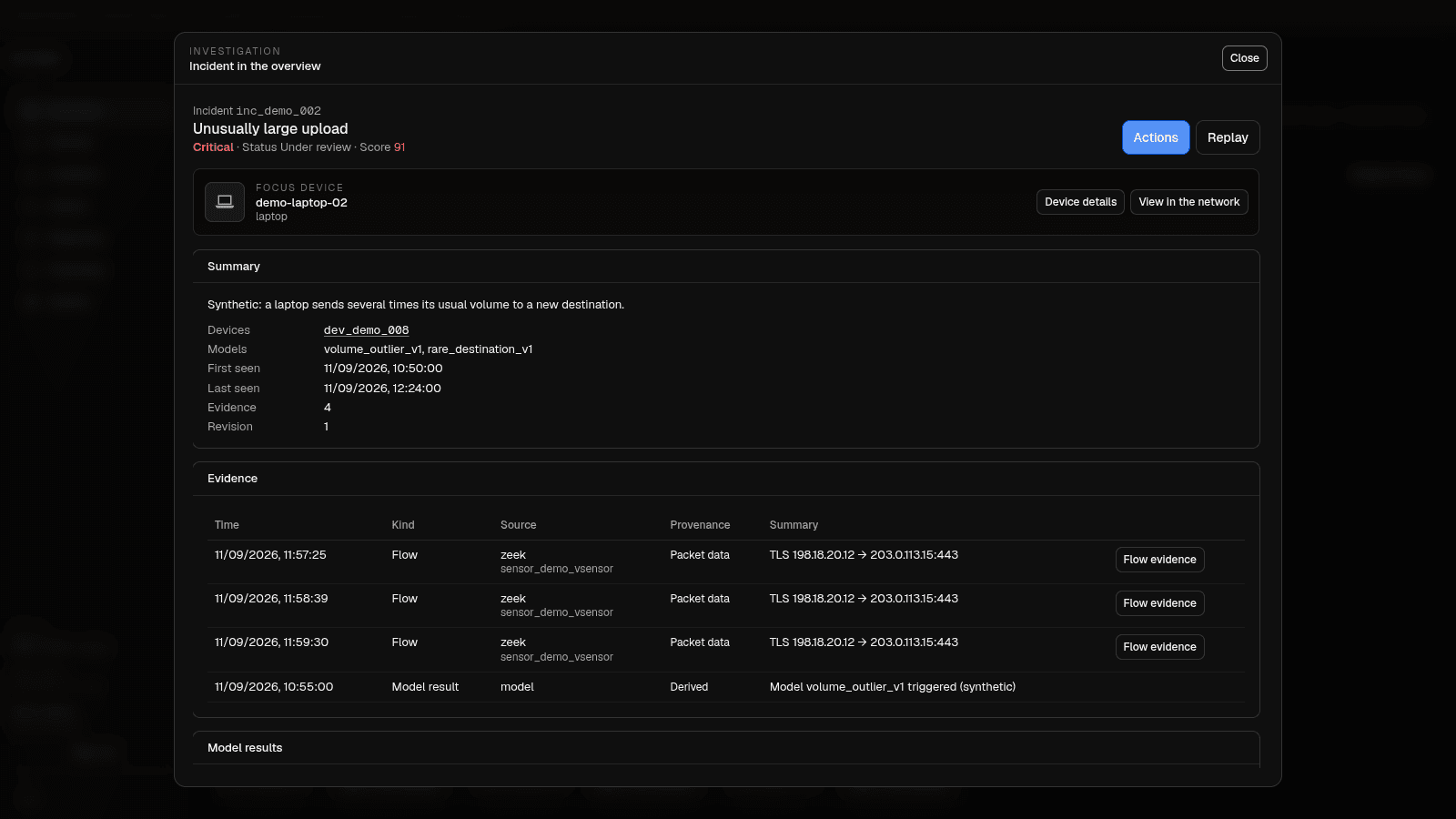
Correlates alerts into incidents and writes down what happened in plain language — with the observation, the model hint and the hypothesis kept apart.
- Merges related alerts into one incident
- Explains the timeline in plain language
- Points at possible lateral movement
- No automatic blocking or execution
Asset Inventory
Every device that speaks on your network, discovered passively: what it is, who it talks to, when it first and last showed up.
- Devices, categories and owners
- Active connections per device
- First-seen and last-seen timestamps
- Behaviour groups of similar devices
- coming soon
Email Security
The next module. Reads delivery and phishing decisions from your mail setup and links mail incidents to the devices and users you already have.
- Delivery and block figures from real events
- Phishing and spam decisions with a reason
- Per-user baselines
- Mail incidents joined to network evidence
What you get
Detail the globe only gestures at
Six things that turn raw traffic into a network you can actually reason about — and act on — each documented in full on the docs site, not asserted here.
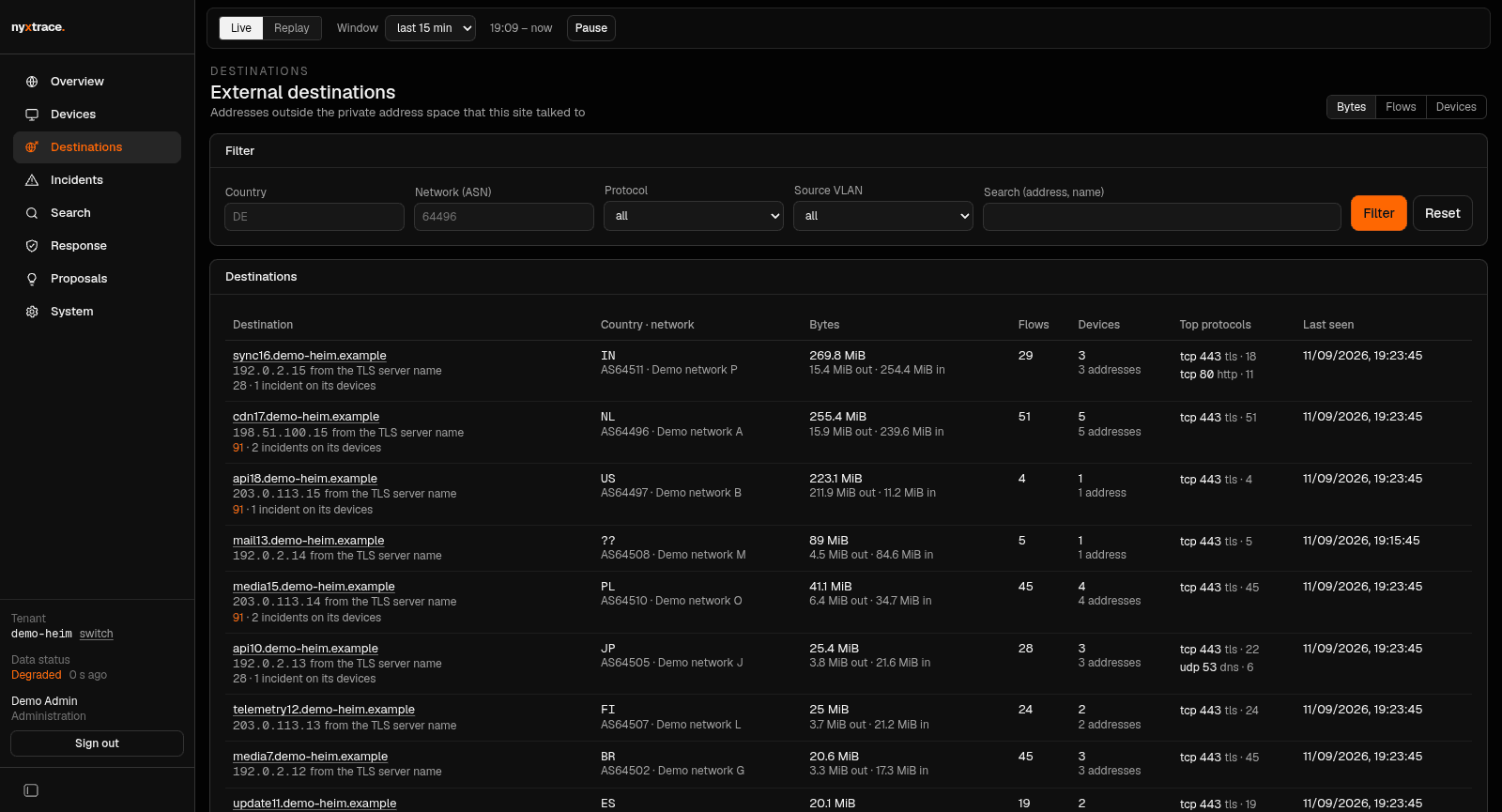
External destinations, ranked
Every address outside your network that a device actually talked to, ranked and filterable by country, ASN and protocol, with a name read off the connection itself — the TLS server name or the HTTP host header — never a DNS guess. See external destinations.
Broadcast and multicast are not peers
Every address carries a class before it reaches a graph, a list or a detector: broadcast, multicast and link-local addresses are never shown as a foreign peer, and the detectors ignore that same local noise instead of flagging a television announcing itself as a new external destination. See address classes.
Names, not just addresses
A device name is resolved from whichever source actually knows one — NetBox, the guest name your Proxmox VE hypervisor holds, a UniFi controller, the host name from a DHCP lease (valid exactly as long as the lease), an mDNS name, the client name your Pi-hole or AdGuard Home holds, then reverse DNS, tried in that order — and a name you type yourself always wins over all of them. See device naming.
- Pro
Threat-intel feeds and model packs
A daily, fail-closed refresh builds an indicator list from abuse.ch’s Feodo Tracker, SSL Blacklist and URLhaus on the appliance; a match is marked on the record as
threat_intel_matchrather than inventing a score of its own. Pro installations receive a curated, signed bundle from the key server instead, and signed model packs that load over the built-in models — verified before install, never code. See threat intelligence. - Pro
An optional AI analyst
Bring your own OpenAI key and a hard daily budget in real dollars; the analyst reads evidence and proposes triage steps and incident narratives under a strict JSON schema, never executes anything, and is off by default. A Pro licence adds a monthly quota per installation — a product limit the appliance applies itself, no proxy. See the OpenAI analyst.
- Pro
Automatic response
An approved quarantine is carried out for real: on OPNsense or pfSense through a fixed-scope companion that knows six operations and nothing else — no firewall API key — or as a client block on a UniFi controller. Every block carries a TTL and is released on its own, an HA pair is written standby node first, your protected scopes are never touched, a human approves first, and it is off by default. See automatic response.
A look inside
The actual interface
Screenshots from the current build, filled with synthetic demo data.
How it works
From packets to a decision you can defend
No agents on every machine, and none of your captured traffic leaves the appliance. Nyxtrace listens where your traffic already passes and turns it into something readable.
- 01
Run the appliance
One box on your network: a Go data path with ClickHouse for storage and a Next.js interface. Bare metal or a VM — your data stays where you put it.
- 02
Point your sources at it
Zeek and Suricata events, NetFlow and DNS logs from OPNsense, plus a mirrored vSensor on Proxmox for the traffic your firewall never sees.
- 03
Let it learn your normal
Nyxtrace builds a baseline per device and behaviour group over a few weeks, then flags what deviates from it instead of matching signatures alone.
- 04
Read incidents, then decide
Alerts arrive merged into incidents with a written explanation and the raw evidence behind it. You keep the decision — nothing is blocked behind your back.
Data path: Zeek / NetFlow / Suricata / DNS → Go collector → ClickHouse → behaviour models → incidents
For homelabs
Built for the network you already run
Commercial NDR assumes a SOC team, a per-seat licence and a cloud tenant. Nyxtrace assumes a rack in a basement, a few VLANs and one person who wants to know what is going on.
OPNsense first
NetFlow, Suricata EVE events and DNS logs are read straight from OPNsense. Nothing to compile, no packages on the firewall you have to maintain yourself.
Proxmox vSensor
East-west traffic between VMs never reaches the firewall. A mirrored sensor on the hypervisor feeds it in, so lateral movement is not a blind spot.
Zeek and Suricata, not reinvented
Nyxtrace uses the tools the industry already trusts for protocol logs and signatures, and spends its own effort on correlation, inventory and explanation.
No cloud required
The appliance runs on your hardware and keeps its data locally. No account is needed to look at your own network, and the free core runs with the daily heartbeat switched off if you prefer.
Connectors
Bring in what you already run
Every source is read-only against the thing it talks to; none of them can change a setting on your firewall, hypervisor, controller or inventory. The outputs only ever send what the dashboard already shows. The two response targets are the one deliberate exception: they write exactly one thing, after a person approved it, and undo it on a timer.
OPNsense / Suricata + NetFlow
NetFlow, Suricata IDS events and resolver query logs, read passively from an OPNsense or pfSense firewall — nothing here can ask it to block anything. Read more.
Zeek
The packet-level source: reads from a passive capture interface and writes session metadata for everything a mirror actually sees. Read more.
Proxmox vSensor
Mirrors east-west traffic between VMs on the hypervisor into an isolated bridge, for the lateral movement your firewall never sees. Read more.
UniFi Network
ProA read-only, view-only account on the controller: active and known clients with their name, access point, SSID, VLAN and switch port. Read more.
NetBox
ProA read-only API token reads device and virtual-machine names, roles, sites, tenants and descriptions straight into the inventory. Read more.
Pi-hole
Your resolver as a DNS feed and a naming source: every query with its verdict, the clients Pi-hole knows as device names, and a mark on every domain it blocked. Read more.
AdGuard Home
The same feed from AdGuard Home over a dedicated read-only user: the query log with its filter verdict, persistent and discovered clients as names. Read more.
DHCP leases (Kea / ISC)
Reads the lease store of Kea or ISC dhcpd — a file, a mount or the Kea Control Agent — for host names that expire with the lease and the MAC behind every address. Read more.
Proxmox VE
A read-only API token inventories every VM and container of the cluster — name, node, tags, pool — and pins each address to the virtual NIC that carries it, straight from the guest agent. Read more.
Webhook
Signed incident and health events — created, escalated, closed, a component changing state — as one HTTP POST per event to a receiver you name, delivered at least once and in order, with a link back into the dashboard. Read more.
Prometheus / Grafana
A metrics endpoint behind a bearer token: health component states, per-feed ingest rates, incidents by status and severity, connector counters, licence and updater — bounded labels, never a device or an address. Read more.
Chat notifications
ProThe same incident and health events as a short readable message in Telegram, Discord, Slack or Matrix — severity, title, device names, one line of summary and a link back — escaped per platform, so a hostile hostname can never page a channel. Read more.
OPNsense / pfSense response
ProPuts an approved device into the tenant's quarantine alias on an HA pair, standby node first, through a small companion on each node that answers one signed request, knows six pfctl forms and keeps its own copy of the protected scopes — no firewall API key. Every entry expires on the firewall itself even if the appliance is down. Read more.
UniFi client block
ProBlocks the wireless client that holds an approved address on the controller and unblocks it on release, with a durable ledger of what it blocked so a restart never lifts a block a person made. No expiry on the controller — the appliance's release is the way back. Read more.
The firewall, packet and hypervisor sources above are part of the free core’s ingest, and Pi-hole, AdGuard Home, DHCP leases and Proxmox VE are Free connectors that need no licence key — as are two of the three outputs, the webhook and the metrics endpoint. UniFi, NetBox and the chat notifications are Pro, granted by the same connector pack as the higher tiers; the two response targets are Pro under the separate response feature and are off until you declare one — see Free vs Pro.
Editions
Free core, paid depth
Nyxtrace is freemium, and the split is a module boundary rather than a configuration switch: the free core does not contain the Pro code, so it is genuinely auditable and a paid module that is not licensed simply does not register.
Free
AGPL-3.0open-source core
The open-source core under AGPL-3.0. A complete program you can read, run and keep — not a trial and not a crippled build.
- Sensors and firewall feeds
- Globe and network map
- Device inventory
- Incidents with evidence
- Replay of any time window
- Search across the whole data set
- Self-hosted, your hardware, your data
- Community support
- Planned
Basic
$15per month
The Pro modules on top of the core, and the part of Pro that lives on our server: the things that cost money to build, host and keep current.
- A curated, signed threat-intel feed, one bundle a day
- Signed model packs, loaded over the built-in models
- An AI analyst quota per installation and month
- Automatic response
- Connectors beyond the core set
- Priority updates
Pricing planned, not yet purchasable — join the waitlist.
- Planned
Tiers
$35 / $55per month
Two larger tiers for people running more than one instance, or more of everything on one.
- More seats and more instances
- More connectors
- The extensions bundle
- A higher analyst quota per installation
Pricing planned, not yet purchasable — join the waitlist.
Extensions available individually. Single integrations can be bought on their own instead of taking a tier for one of them; the larger tiers include the bundle.
Part of Pro is a service rather than a binary: the feed bundle is signed with its own key and valid for fourteen days, a model pack is signed with the release key and can add models and roles but never weaken a shipped policy, and the analyst quota is a product limit the appliance applies against your own OpenAI key — best effort, no proxy. A free installation keeps its local abuse.ch refresh and the built-in models. What each one is, and the honest limit of the download gate, is written down under Pro content.
Nothing on this page is a purchase offer: there is no checkout yet, and the figures above are the planned prices rather than a price list. The module split is written down in the editions documentation and will be published together with the licence before anyone is asked to pay.
Licensing
Licensing & activation
The honest version: the paid modules are gated by a check against a server we run. Here is exactly what that means for an appliance in your basement.
An online check, stated plainly
Pro features ask the Nyxtrace licence server whether they are paid for. That check needs a working internet connection — the free core never does.
Short-lived entitlement tokens
The server answers with a signed entitlement token that expires on its own. The appliance renews it in the background; a stolen token is worth nothing for long.
Seats bound per installation
A seat is tied to an installation identity the appliance generates for itself on first start. Move the installation and the seat moves with it.
72 hours of grace
If the licence server is unreachable, Pro modules keep working for 72 hours before they stop. Ingest, storage and the whole core keep running either way — a licence problem never blinds your network.
No hardware fingerprinting
We do not read your MAC addresses, disk serials, CPU IDs or anything else about the machine to lock a licence to it. The installation identity is a random value the appliance writes once, and you can see it. The mechanics are documented under editions & licensing.
Telemetry
Instance registration & telemetry
Open source does not have to mean that nothing is ever sent home. Every installation registers itself once and then sends one minimal heartbeat a day, so we know how many appliances exist and which versions are still out there.
What the heartbeat contains
One request a day, and it is this short. The counts are buckets — a range such as 11–50 devices, not the number itself.
- The Nyxtrace version
- The operating system
- The plan in use
- Bucketed counts, never exact numbers
- Which source types are active
- The country, derived from the request
What it never contains
Not “anonymised” and not “aggregated later” — these simply never leave the appliance:
- IP addresses
- MAC addresses
- Hostnames
- Device names
- Flows or connection records
- Incident content
Visible, and switchable on Free
The exact payload of the last heartbeat is shown in the dashboard under System, so you can read what was sent instead of taking our word for it. On Free you can turn the whole thing off with NDR_TELEMETRY=off and nothing else changes. Pro needs the registration, because that is where the seat and the entitlement live.
The full privacy model is documented under security & privacy, and the operational side — what to check when a heartbeat fails — under operations.
Early access
Get on the waitlist
Nyxtrace is being built and run on a real homelab first. Leave your address and you will hear from us when there is an installable build — not before.
What you can expect. One message when early access opens, and one more if the plan changes materially. That is it.
What we will not claim. There are no customer numbers, no detection rates and no case studies on this page, because there is nothing honest to put there yet.
Prefer email? Reach us at [email protected].